
Run Multiple Claude Code Accounts in Parallel on One Mac
Switching between more than one Claude Code account on the same machine is painful. You go through claude auth logout, claude auth login, the browser opens, you sign in, click back to the terminal. After all that, your projects, MCP servers, and conversation history are still wired to whichever account you just left. So I built a small macOS menu bar app that swaps them in one click and lets you run two accounts in parallel, one per folder. It ships through Homebrew.
brew tap jafar-albadarneh/tap
brew install --cask claude-switch
This article walks through what Claude Switch does, why it isolates everything by default, and the technical decisions behind it. The code is open source at github.com/jafar-albadarneh/claude-switch.
The problem
Claude Code stores its session in two places: a generic-password item in the macOS Keychain (Claude Code-credentials) and a file at ~/.claude.json that holds the account identity plus all of your projects, MCP servers, plugins, and UI state. The rest of the dot-claude tree under ~/.claude/ carries conversation history, skills, slash commands, and statistics caches.
If you have two paid accounts, the official path is claude auth logout, claude auth login, wait for the browser, sign in, click back. Your projects, history, and plugins survive that, because they're keyed by your filesystem layout and not by the account. Which sounds fine until you actually use it: a project you set up under account A is now visible from account B, the MCP servers you wired for one are loaded for the other, and any in-progress conversation context bleeds across.
The first design question for me was scope. Just swap the token, or isolate everything?
I picked isolate everything. Two accounts on one Mac should behave like two different installations: separate projects, separate history, separate plugins, separate skills, separate global CLAUDE.md. The only thing they share is the operating system.
What Claude Switch does
A status bar icon drops down a list of your accounts. Each row shows the avatar, the email, and the live 5-hour and 7-day usage percentage for the active account. Click a row to switch the entire machine to that account. Click Add account… to drive a fresh claude auth login flow under a new isolated profile.
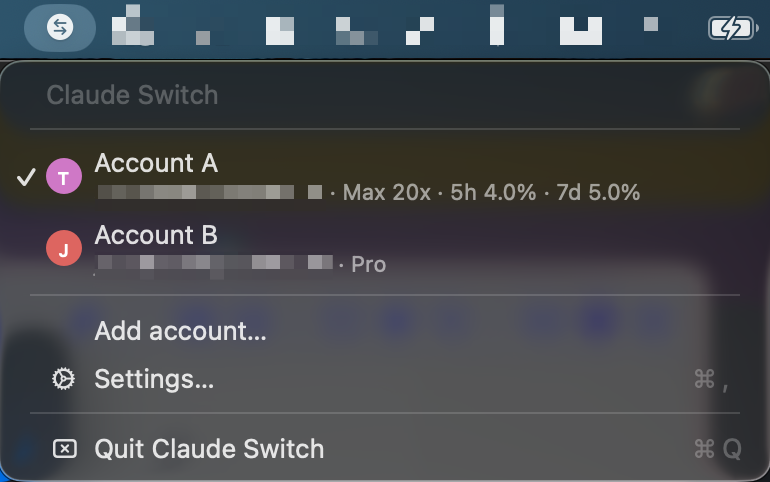
Behind that simple menu sit a few choices worth talking about.
One isolated profile per account
Each account lives under ~/.claude-switch/profiles/<id>/:
profiles/<id>/
  profile.json              metadata: display name, email, plan, avatar color
  config/
    .claude.json            this profile's saved ~/.claude.json snapshot
    .claude/                the entire ~/.claude tree for this profile
    .credentials.json       staged at bind time so claude can refresh itself
When you click an account in the menu bar, ~/.claude becomes a symlink to that profile's config/.claude/, and ~/.claude.json gets copied in. When you switch away, the file is flushed back so any updates Claude Code wrote to it (refreshed tokens, project state, MCP edits) are captured into the saved snapshot.
Symlinking the directory works because Claude only reads from and appends to files inside it. The top-level ~/.claude.json has to be a real file though. Claude rewrites it constantly by writing to a temp file and renaming it on top, and that pattern replaces a symlink with a regular file the first time it runs. So I keep the directory as a symlink and the JSON as a copy, flush it back on switch, and that's it.
The config/ sub-directory matters for the parallel-bindings flow below: CLAUDE_CONFIG_DIR points at it, and claude reads .claude.json + .claude/ + .credentials.json from there as one self-contained world.
Tokens stay in the Keychain
The OAuth token never touches disk in plaintext for the menu-bar default path. The macOS Keychain holds two kinds of items:
Claude Code-credentials/$USER: what Claude Code actually reads when noCLAUDE_CONFIG_DIRis set. Swapped on every menu-bar switch.claude-switch:<profile-id>/$USER: each profile's saved token blob, the source of truth.
For bindings, the per-profile blob is also staged as config/.credentials.json so claude can refresh + rotate it autonomously inside that profile's config dir. The applier slurps any rotated credentials back into the Keychain item on the next cd, so the backup stays current and the file stays in sync with whatever claude has refreshed.
The first time the app reads the Keychain you get one macOS permission dialog. Click Always Allow, and every switch after that is silent.
Settings, with a sidebar
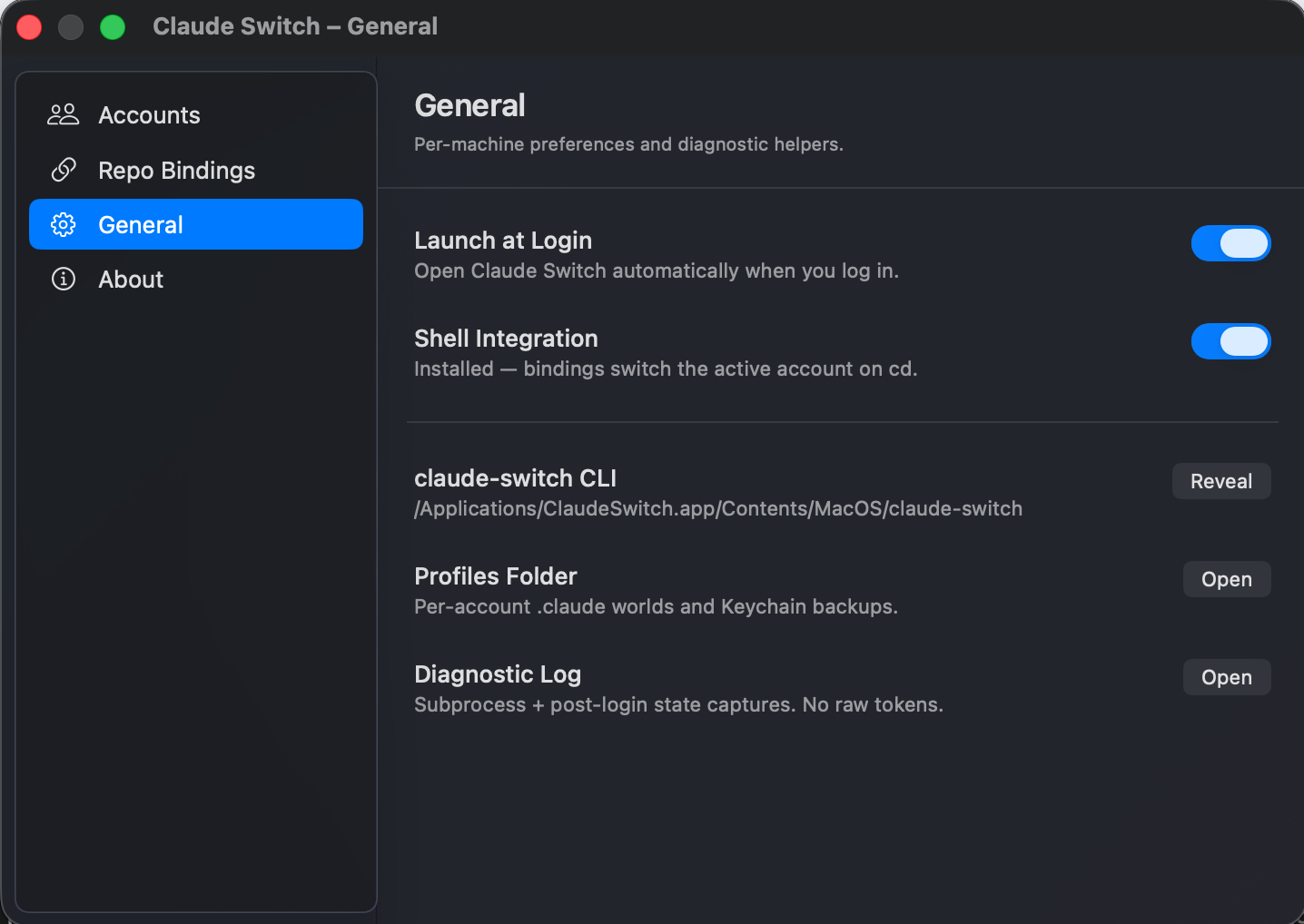
The menu bar dropdown stays small: header, account rows, Add account, Settings, Quit. Everything else moved into a tabbed Settings window with a left sidebar, modelled after macOS System Settings.
Four tabs: Accounts for switching, renaming, removing, or adopting your current setup; Repo Bindings for per-project automation; General for launch-at-login, shell integration, and reveal-in-Finder helpers; About for the version and the disclaimer.
Per-repo bindings, parallel by default
This is the feature that became the headline of v0.2. You bind a folder to an account, and the next claude you run inside it uses that account, scoped to that shell only. Open a second terminal in a different bound folder, and you have two simultaneous Claude sessions on two different accounts, fully isolated. The menu-bar default is untouched.
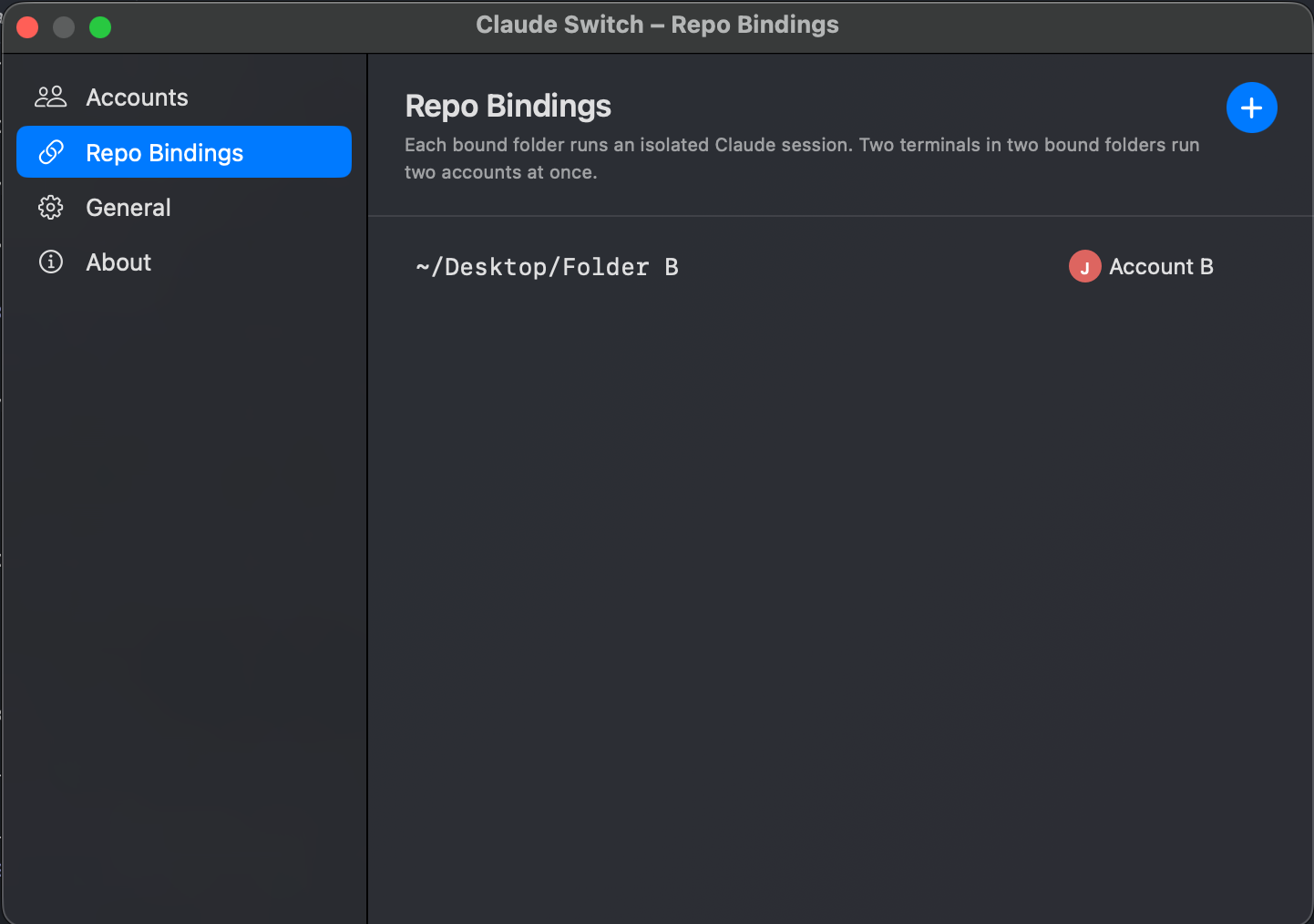
The mechanism is built on two Claude Code env vars I found by grepping the binary's strings table. CLAUDE_CONFIG_DIR redirects the entire ~/.claude/ + ~/.claude.json world per-process to whatever directory you point at. Combined with a staged .credentials.json inside that directory, claude treats the bound folder as a normal claude.ai session, refreshes + rotates tokens on its own, and never touches the global keychain.
The wiring is a small shell hook (zsh chpwd or bash PROMPT_COMMAND) installed by the bundled claude-switch CLI:
# Inside ~/.zshrc (installed by `claude-switch install`)
eval "$(command claude-switch ensure-for "$PWD" 2>/dev/null)"
On cd, ensure-for looks up the binding, stages .credentials.json from the per-profile Keychain backup, and emits two lines of shell:
export CLAUDE_CONFIG_DIR=/Users/.../claude-switch/profiles/<id>/config
unset CLAUDE_CODE_OAUTH_TOKEN
The hook evals them, and the next claude invocation reads its world from the bound profile's config/ directory. cd into an unbound folder and the env vars get unset automatically, so unbound shells fall back to the menu-bar default. Same pattern direnv uses.
A few subtle decisions. Bindings never mutate global state, so there's no running-Claude guard for them: concurrent sessions are fine. Longest-prefix matching uses path-component boundaries, so binding /foo doesn't fire on cd /foobar. And there's no file lock or daemon: closing the terminal cleans itself up because the env vars die with the shell.
Per-account quota
The active account's 5-hour and 7-day rate-limit utilization comes from Anthropic's undocumented /api/oauth/usage endpoint with the anthropic-beta: oauth-2025-04-20 header. It's the same data Claude Code itself fetches internally, surfaced inline on the active row so you can see at a glance whether you're about to hit your limit before you start a deep session.
Safety net
A switch is several steps stacked together: flush the active account's state, swap a Keychain item, atomically repoint the ~/.claude symlink, copy ~/.claude.json in. Anything in that chain can fail, so the engine layers a few safeguards:
- Pre-switch backup. Every mutation starts with a timestamped snapshot of the live
~/.claude.jsonand the current symlink target under~/.claude-switch/backups/. - Atomic symlink swap. The new symlink is written to a temp path and POSIX-renamed over the old one, so the link is always either fully old or fully new.
- Rollback on failure. If any step throws, the engine restores from the snapshot it just took. You're never left in a broken half-state.
- Running-Claude guard. Menu-bar swaps refuse to fire while a
claudeprocess is alive (with a "Switch Anyway" override), because that session would adopt the new account on its next API call. Bindings are exempt: they don't mutate the global state any other session can see. - Stop managing this account. A per-row action that moves the profile's
.claude/back to~/.claudeas a regular directory and stops tracking it. The Keychain token stays put, so you stay signed in. - Manual undo. Worst case, the repo README walks through it: delete the symlink, move the profile directory back, remove
~/.claude-switch. Three commands, no app required.
Install
The app is notarized by Apple and ships through my Homebrew tap. On macOS 14 or later:
brew tap jafar-albadarneh/tap
brew install --cask claude-switch
That drops ClaudeSwitch.app into /Applications and puts the bundled claude-switch CLI on your PATH. Launch the app from Spotlight, click the menu bar icon, and pick Add account… to capture your first account.
The first time the app reads the Keychain you get one macOS permission dialog. Click Always Allow so future switches are silent.
Source is at github.com/jafar-albadarneh/claude-switch, issues and PRs welcome.
Claude Switch is an independent open-source project. It is not affiliated with, endorsed by, or sponsored by Anthropic.
Happy Eid and happy switching!